The primary obstacle for any creator moving from casual experimentation to professional production isn’t the quality of a single image; it is the ability to replicate that quality across a series. In a marketing or content pipeline, a “one-hit wonder” is a liability. If you generate a hero character for a brand campaign but cannot maintain their facial structure, lighting, or stylistic DNA in the next ten frames, the project fails. This phenomenon, often called “style drift,” is the silent killer of AI-assisted creative operations.
Solving for drift requires more than just better prompts. It requires a move toward anchor models—reliable, predictable engines that serve as the foundation for an entire asset library. In the current ecosystem, Nano Banana Pro has emerged as a preferred anchor for those who need to balance high-speed iteration with a specific visual “look.” By grounding the workflow in a stable model and then moving into refined editing phases, creators can finally stop gambling on randomness and start building repeatable pipelines.
The Inconsistency Trap in Professional Creative Work
Most generative AI platforms are optimized for the “wow” factor. They are designed to produce a stunning, unique result from a simple prompt. While this is excellent for inspiration, it is counterproductive for a production-heavy environment. When a creative director asks for a series of social media banners, they aren’t looking for three different artistic interpretations; they are looking for one unified vision executed across three formats.
The trap lies in the underlying randomness of latent diffusion. Without a structured approach, every new generation is a roll of the dice. Even with the same prompt, a slight shift in the seed or a minor adjustment in the aspect ratio can lead to a complete departure from the original aesthetic. This is where most solo creators hit a wall. They spend hours chasing a specific look that they accidentally achieved once but cannot find again.
Professional workflows mitigate this by selecting a specific model—like Nano Banana Pro—and sticking to it for the duration of a project. By using a consistent model, the operator limits the number of variables in the equation. You aren’t just fighting the AI; you are learning its specific biases, strengths, and limits.
Establishing the Workflow Anchor with Nano Banana Pro
The workflow begins with the selection of the base engine. For many creators, Nano Banana serves as the initial canvas because of its balance between prompt adherence and stylistic flexibility. Unlike “jack-of-all-trades” models that try to simulate every possible art style simultaneously, Nano Banana Pro tends to have a more predictable response to lighting and texture cues.
In a practical scenario, an operator might start by generating a high-fidelity base image. This is the “Anchor Image.” It defines the palette, the depth of field, and the core character or product features. Once this is established, the workflow shifts from generation to transformation. Instead of writing a new prompt from scratch for the second image, the creator uses the first as a reference.
It is important to note a moment of limitation here: even with a strong anchor model, perfect 1:1 consistency is still technically impossible in current generative architectures. There will always be a degree of variance in micro-textures or fine background details. The goal of the professional is not to eliminate this variance entirely—which is a fool’s errand—but to manage it so that it falls within an acceptable margin of brand tolerance.
Refinement via the AI Image Editor
Once the anchor image is generated, the heavy lifting moves to the AI Image Editor. This is where the “AI feel” is stripped away and replaced with intentional design. In a professional pipeline, the raw output from a model is rarely the final product.
The AI Image Editor allows for selective modification. If the composition is perfect but the lighting on a specific subject is too harsh, the operator doesn’t re-generate the whole scene. Instead, they use in-painting or localized editing to fix the specific area. This surgical approach is what separates a “pro” workflow from a “casual” one. It’s the difference between using a sledgehammer and a scalpel.
Using the AI Image Editor effectively also involves understanding “Image-to-Image” logic. By feeding a slightly modified version of your anchor image back into the system, you can generate variations that are cousins, not strangers, to your original. This is the most effective way to build out a suite of assets—product shots, lifestyle backgrounds, or character poses—that look like they belong to the same shoot.
Transitioning to Video without Losing the Thread
The most difficult transition in the AI creator workflow is moving from a static image to a moving one. This is where style drift often turns into total visual collapse. A video generator might interpret a static character differently, changing their clothes, hair color, or even gender between the first and fiftieth frame.
To solve this, creators are increasingly using an “Image-to-Video” approach. By taking the refined output from the AI Image Editor and using it as the first frame of a video generation, you provide the AI with a strict visual constraint. You are essentially telling the machine, “This is the reality; don’t deviate from it.”
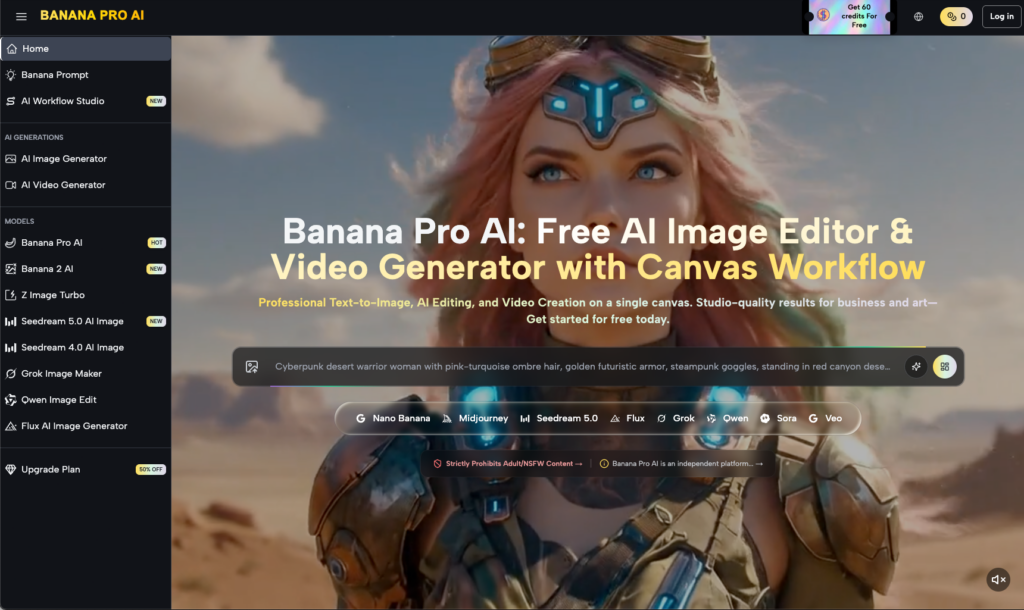
Within the Banana AI ecosystem, this pipeline is streamlined to ensure that the stylistic data from the initial image generation carries over into the motion phase. However, there is a necessary expectation-reset required for video: temporal consistency is still a developing frontier. Even with a strong starting frame, movements can sometimes appear “rubbery” or physics-defying. Professional editors often compensate for this by generating several short clips and selecting only the most stable segments, rather than trying to generate a single, long perfect take.
The Role of Canvas and Workspace Management
A repeatable workflow is also about organization. Managing dozens of iterations of a single concept can quickly become a data nightmare. Professional creators often utilize a canvas-based workflow where they can see the lineage of their generations.
By laying out the evolution of an image—from the first rough sketch in Banana Pro to the final polished asset—the creator can identify where a project started to go off the rails. If an image feels “off,” you can look back three steps and see which specific prompt adjustment or filter caused the drift.
This spatial way of working also helps in identifying patterns. You might realize that Nano Banana Pro handles “cinematic lighting” exceptionally well but struggles with “neon noir” unless specific negative prompts are used. This type of institutional knowledge is the real “secret sauce” of a high-output content team. They aren’t just better at prompting; they are better at diagnosing the model’s behavior.
Scaling the Output: From Individual Creator to Team
When a workflow is anchored in a tool like Banana Pro, it becomes transferable. A solo creator can document their process—the specific model settings, the preferred AI Image Editor configurations, and the successful prompt structures—and hand it off to a junior editor or a teammate.
This is the definition of scaling. If your “style” is just a feeling in your head, you can’t scale. If your style is a documented pipeline using Nano Banana Pro and a specific set of refinement steps, you can produce content at 10x the speed of a traditional agency without a drop in quality.
The industry is moving away from the era of “AI as a toy” and into the era of “AI as an industrial tool.” In this new landscape, the winner isn’t the person with the most creative imagination, but the person who can reliably deliver a high-quality product on a deadline.
Building the Future Pipeline
The evolution of these tools is rapid, but the fundamental logic of the workflow remains the same. You establish an anchor, you refine with precision, and you move into motion with constraints. Whether you are using Nano Banana or the next iteration of the engine, the discipline of preventing drift is what defines your value as a creator.
As we look forward, the integration between static image editing and video generation will only tighten. The goal is a seamless “flow state” where an idea can move from text to a polished, high-definition video sequence in a single session. However, the human element—the operator who knows how to tweak the AI Image Editor just enough to fix a stray pixel, or who knows when to tell the AI to stop—will remain the most critical part of the chain.
The professional AI workflow isn’t about pushing a button and getting a result. It’s about building a system that makes the result inevitable. By utilizing models like Nano Banana Pro and treating the generation process as a series of controlled iterations, creators can move past the inconsistency of the “AI lottery” and into a sustainable, scalable era of production.